Invite only
Access is for friends and family. No random sharing, no public posting.
 NickFlix
Welcome to

A private invite-only media library for friends and family. Log in through Plex, grab the popcorn, and try not to judge the size of the movie hoard.
Last 5 movies and last 5 TV shows, pulled from Plex when Nick updates the site.
Loading...
Loading...
Access is for friends and family. No random sharing, no public posting.
Open Plex, sign in, choose NickFlix from your sidebar, then pin it so it stays there and is easy to find next time.
If something is broken, buffering, or missing, message Nick instead of rage-clicking the universe.
Install the Plex app, sign in, then choose NickFlix from the sidebar.
The server is currently marked as online. If it is acting weird, message Nick and say what device you are using.
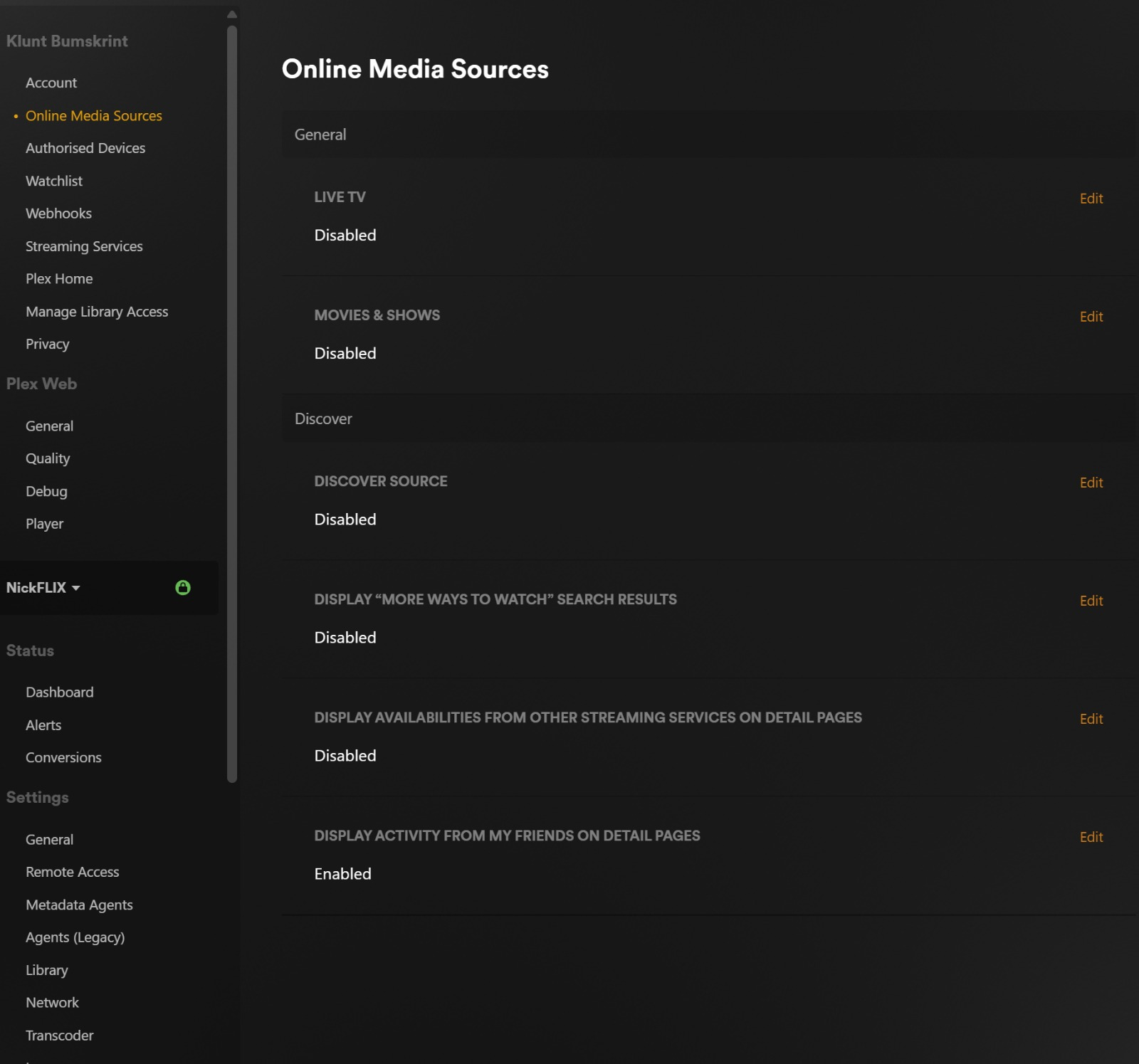
If Plex is showing loads of its own online stuff, you can switch most of it off from a browser. That leaves you with the NickFlix server instead of all the extra Plex clutter.
Once that is done, Plex feels much cleaner and your sidebar should mainly show the NickFlix server.